
Changing stored passwords using Firefox browser is fairly simple. For those with Windows PCs, see caveat at bottom.
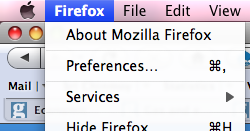
Click on Firefox (top left) – then click on Preferences.
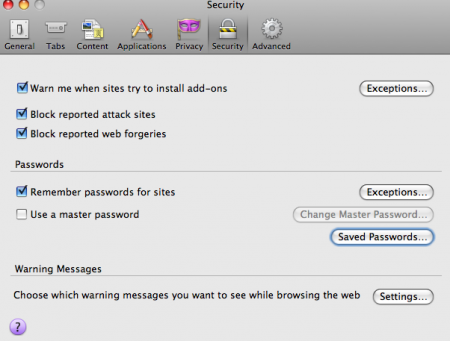
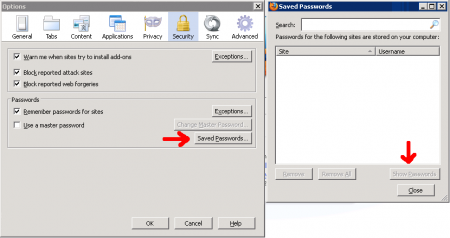
Click on the ‘Security’ tab and click on the ‘saved passwords’ button on the bottom right. A new window will pop up (see below) – to see passwords, press the ‘Show passwords’ button on the bottom right.
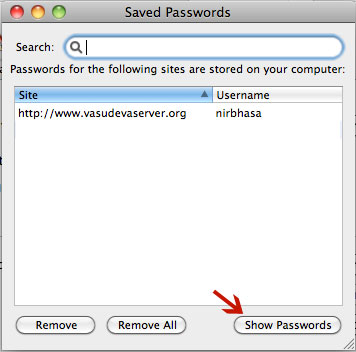
Note: if you have a lot of passwordsstored on your site, you can find the password for your site just by typing the url of the site in the ‘Search’ field at the top.
Stored Passwords on Windows
1. Go to – Tools – Options
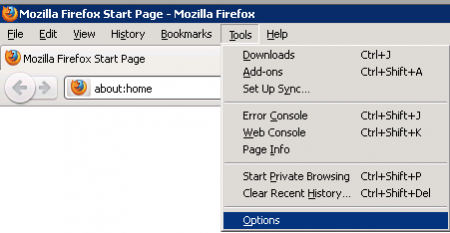
2. In security choose – Saved Passwords and then view passwords
Related
Firefox: Changing Passwords on PC – Important Caveat
It’s true that there’s a simple procedure within Firefox for changing passwords or deleting them altogether. But there’s an important caveat: People who have a Windows PC for many years may end up installing numerous versions of Firefox. Some of these versions leave behind old passwords which are a security vulnerability.
There’s a very good utility called SIW or System Information For Windows. It’s free and lightweight, and can be installed portably:
http://portableapps.com/apps/utilities/siw_portable
After installing it, run it and scroll down the left side. Click on the item labeled “Passwords” or “Secrets.” This might reveal a bunch of old Firefox logins and passwords left behind from previous installs.
If so, locate folders which look something like this:
Documents and Settings\Foo\ApplicationData\Mozilla\Profiles
or
Documents and Settings\Foo\ApplicationData\Mozilla\Firefox\Profiles
Of special concern are these files, buried a couple of levels deep in the Profiles folders:
signons.txt
signons2.txt
signons3.txt
signons.sqlite
key3.db
Delete them and SIW should no longer find any Firefox passwords. Of course, don’t delete your current passwords!
Note: If SIW still finds old Firefox passwords, that probably means you didn’t delete the above files for each user.
Tip: Always use a master password in Firefox, or your site passwords will be easy to hack.
